
Excel, VBA & Power Platform Solutions
Smart Excel. Powerful Automation.
Real Business Impact.
From VAT validation to cash receipt automation and payment run controls, we build Excel + VBA + Power Platform solutions that save time, reduce risk and give your team full control.
Excel & VBA Automation
Example: Fuel Card Invoice Reconciliation & Payroll Deduction
Turn raw operational data into structured, payroll-ready outputs.
A company provides fuel cards to employees with an agreed staff discount. Each month, the supplier provides a detailed invoice in .txt format containing all fuel card transactions.
Instead of manually reviewing hundreds of lines, VBA can automate the full process:
- Import TXT Invoice
- Analyse & Clean Data
- Keep Required Fields
- Summarise Charges by Employee
- Apply / Verify Discount
- Reconcile with Payroll Data
- Flag Differences
- Generate Payroll CSV
How it works
- 01
Import Raw Data
Supplier .txt invoice imported directly into Excel.
- 02
Analyse with VBA
VBA reads the file, removes unnecessary information and structures the relevant transaction data.
- 03
Summarise Employee Charges
Transactions are grouped by employee/fuel card using automated calculations or Pivot Tables.
- 04
Reconcile Against Payroll Data
Employee IDs, names and deduction amounts are compared with the payroll master data.
- 05
Identify Exceptions
Missing employees • unmatched cards • duplicate transactions • unexpected amounts • reconciliation differences.
- 06
Create Payroll Import File
A clean .csv file is generated in the exact structure required for payroll deductions.
Capabilities & insights
- Text File Processing
- Data Cleaning
- Pivot Analysis
- Automated Reconciliation
- Exception Checks
- CSV Export
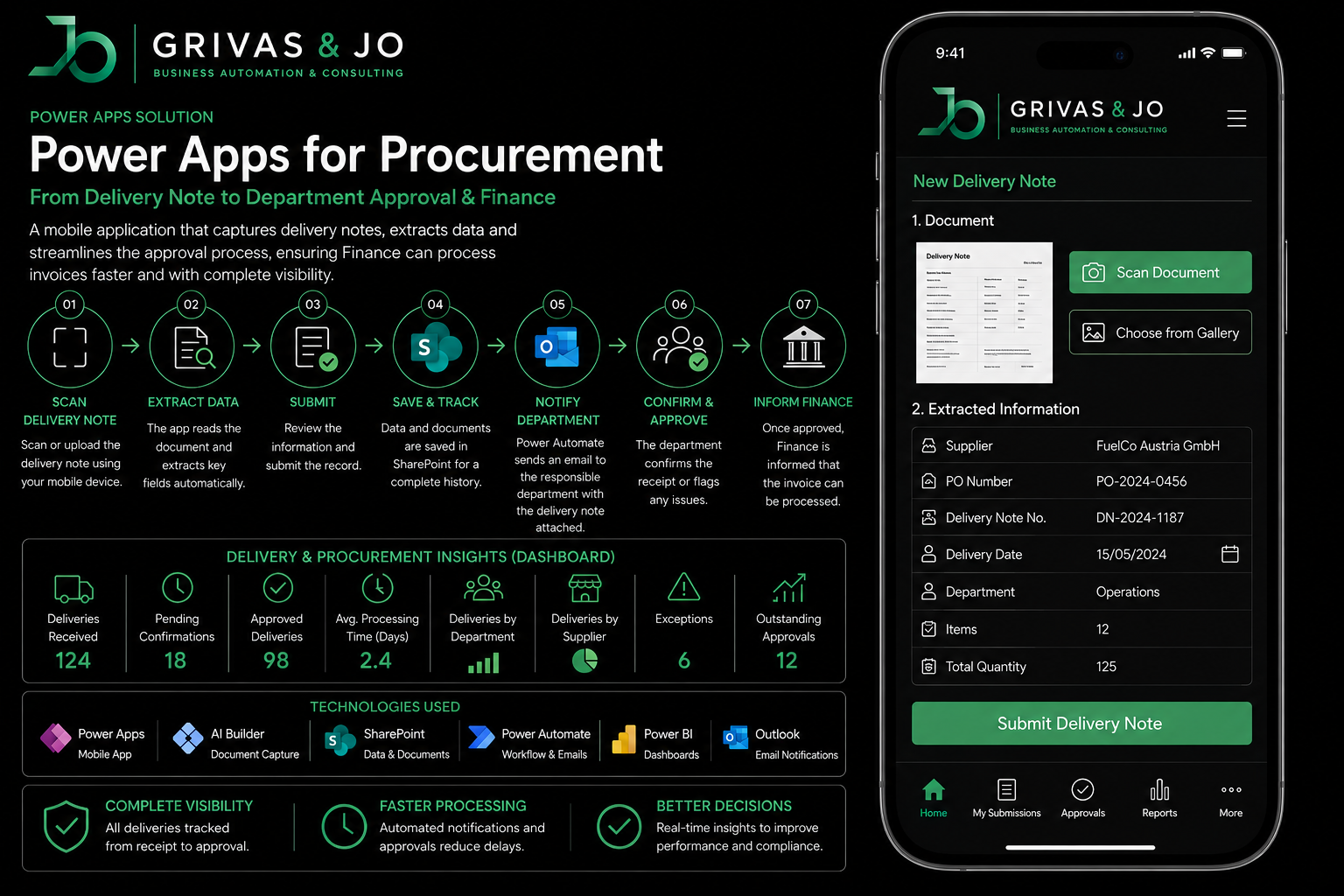
Power Apps Application
Power Apps for Procurement
From Delivery Note to Department Approval & Finance
Payment Run Control
Double Check Your Payment Run Automatically Before You Send It Out
Run smart controls before releasing your payments. Flag risks, review exceptions and pay with confidence.
- Comprehensive control checks
- Automatic exception reporting
- Full audit trail & documentation
- Outlook reporting & notifications
Payment run control overview
Payment run control report
Control checks performed
- Potential duplicate invoices
- High-value payment threshold
- Duplicate payment risk
- Unusual payment amount
- Future-dated invoices
- Split payments
- Payment before due date
- Multiple invoices with identical amounts
- Overdue invoices
- Missing invoice / reference
- Vendor / IBAN mismatch
- Inactive / blocked vendor
- IBAN format by country
- Vendor not in master list
- Country vs IBAN check
- Duplicate vendor IBAN
- IBAN & currency consistency
- Recently changed bank details + immediate payment
- Unexpected bank-account change
- Negative / zero-value payments
- Credit notes in payment run
Let's automate your finance processes
Save time, reduce risk and focus on what really matters.